|
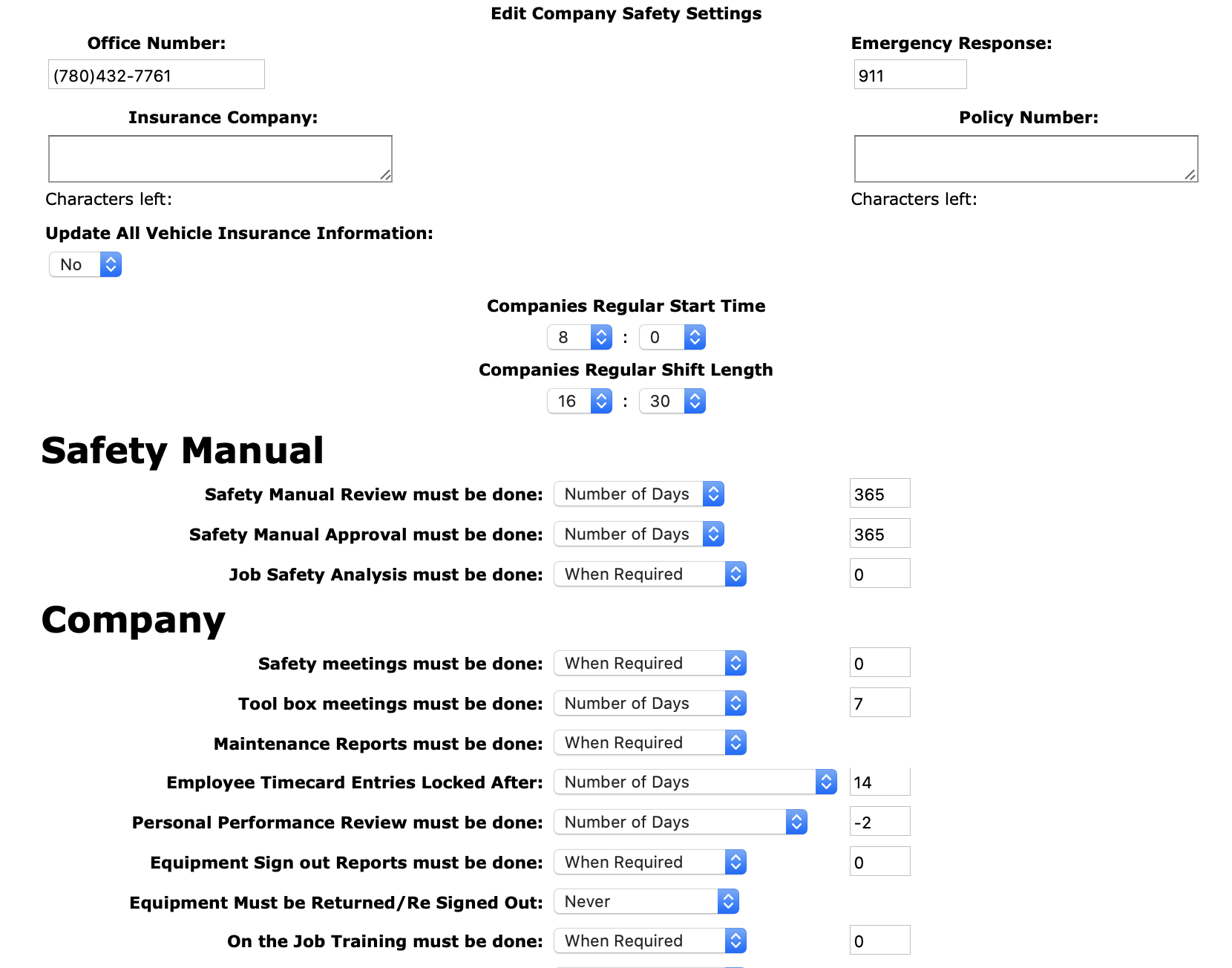
Office Number: Enter the primary office phone number of the company. This number will populate as the office
number on the emergency response plans created later by users. The character limit is 20.
Emergency Number: Enter the emergency number of the area. In North America the number is 911. This number will populate as the emergency
response number on the emergency response plans created later by users. The character limit is 20.
Insurance Company: Enter the insurance company name of for the company vehicles. The character limit is 50.
Policy Number: Enter the policy number of of the insurance policy. The character limit is 50.
Company Timetables
Company's Regular Start Time:Select the hour and minutes of the most common starting time for company field staff.
Shift Length:Select the hour and minutes of the most common shift length for company field staff.
Safety Manual Review must be done:Choose how often a safety manual reviews should be done. From the select box and either choose monthly, yearly, number of days or when required from the select box. If number of days is chosen a number value must be entered.
Safety Manual Approval must be done:Choose how often a safety manual approval should be done, safety manual approvals should be done by management and ownership. From the select box and either choose monthly, yearly, number of days or when required from the select box. If number of days is chosen a number value must be entered.
Job Safety Analysis must be done:Choose how often job safety analysis should be done. From the select box and either choose monthly, yearly, number of days, when required or section turned off from the select box. If number of days is chosen a number value must be entered.
Safety meetings must be done:Choose how often a safety meeting should be done.From the select box and either choose daily, monthly, number of days, when required or section turned off from the select box. If number of days is chosen a number value must be entered.
Tool box meetings must be done:Choose how often a tool box meeting should be done. From the select box and either choose daily, monthly, number of days, when required or section turned off from the select box. If number of days is chosen a number value must be entered.
Maintenance Reports must be done:Choose how often a maintenance reports should be done.From the select box and either choose when required or section turned off from the select box.
Employee Timecard Entries Locked After :Choose how when timecard entries should be locked from employees editing. From the select box and either choose daily, monthly, number of days or only when work order closed from the select box. If number of days is chosen a number value must be entered.
Personal Performance Review must be done:Choose how often a performance reviews should be done.From the select box and either choose after 3 months then yearly, yearly, number of days, when required or section turned off from the select box. If number of days is chosen a number value must be entered.
Equipment Sign out Reports must be done:Choose how often equipment sign out reports should be done. From the select box and either choose daily, monthly, number of days, when required or section turned off from the select box. If number of days is chosen a number value must be entered.
Equipment Must be Returned/Re Signed Out:Choose how often equipment will be signed out to work orders or vehicles. From the select box and either choose daily, every second day, every third day, every fourth day, every fifth day, every sixth day, weekly, bi - weekly, monthly, bi monthly or never from the select box.
On the Job Training must be done:Choose how often on the job training should be done. From the select box and either choose monthly, yearly, number of days, when required or section turned off from the select box. If number of days is chosen a number value must be entered.
Safety Alerts must be done:Choose how often safety alerts should be done. From the select box and either choose when required or section turned off from the select box.
Questionnaire must be done:Choose how often questionnaires should be done. From the select box and either choose when required or section turned off from the select box.
Log Book must be done:Choose how often log book entries should be done. From the select box and either choose when required or section turned off from the select box.
Journey Management Plan must be done:Choose how often journey management plans should be done. From the select box and either choose monthly, yearly, number of days, when required or section turned off from the select box. If number of days is chosen a number value must be entered.
Bulletin must be done:Choose how often bulletins should be done. From the select box and either choose monthly, yearly, number of days, when required or section turned off from the select box. If number of days is chosen a number value must be entered.
Assessment Form must be done:Choose how often assessment forms should be done. From the select box and either choose monthly, yearly, number of days, when required or section turned off from the select box. If number of days is chosen a number value must be entered.
Lesson Plan must be done:Choose how often lesson Plans should be done. From the select box and either choose monthly, yearly, number of days, when required or section turned off from the select box. If number of days is chosen a number value must be entered.
Hazard Assessments must be filled in:Choose how often a hazard assessment should be done. From the select box and either choose daily, monthly, number of days, when required or section turned off from the select box. If number of days is chosen a number value must be entered.
Emergency Response Plan for job sites must be done:Choose how often a emergency response plan should be done. From the select box and either choose daily, monthly, number of days, when required or section turned off from the select box. If number of days is chosen a number value must be entered.
Site Orientations must be done:Choose how often a site orientation should be done. From the select box and either choose daily, monthly, yearly, number of days, when required or section turned off from the select box. If number of days is chosen a number value must be entered.
Ground Disturbance must be done:Choose how often a ground disturbance should be done. From the select box and either choose daily, monthly, number of days, when required or section turned off from the select box. If number of days is chosen a number value must be entered.
Fall Protection Plan must be done:Choose how often a fall protection plan should be done. From the select box and either choose daily, monthly, number of days, when required or section turned off from the select box. If number of days is chosen a number value must be entered.
Confined Space Entry must be done:Choose how often a confined space entry should be done. From the select box and either choose daily, monthly, number of days, when required or section turned off from the select box. If number of days is chosen a number value must be entered.
Pre Job Planning must be done:Choose how often a pre job planning reports should be done. From the select box and either choose daily, monthly, number of days, when required or section turned off from the select box. If number of days is chosen a number value must be entered.
Hazard Report must be done:Choose how often a hazard reports should be done. From the select box and either choose daily, monthly, number of days, when required or section turned off from the select box. If number of days is chosen a number value must be entered.
Site Inspection for job sites must be done:Choose how often a site Inspection should be done. From the select box and either choose daily, monthly, number of days, when required or section turned off from the select box. If number of days is chosen a number value must be entered.
Vehicle Inspection must be done:Choose how often a vehicle inspection should be done. From the select box and either choose daily, monthly, number of days, when required or section turned off from the select box. If number of days is chosen a number value must be entered.
PPE Inspection must be done:Choose how often a ppe inspection should be done. From the select box and either choose daily, monthly, number of days, when required or section turned off from the select box. If number of days is chosen a number value must be entered.
Equipment Inspection must be done:Choose how often a equipment inspection should be done. From the select box and either choose daily, monthly, number of days, when required or section turned off from the select box. If number of days is chosen a number value must be entered.
Safety Inspection must be done:Choose how often a safety inspection should be done. From the select box and either choose daily, monthly, number of days, when required or section turned off from the select box. If number of days is chosen a number value must be entered.
Fire Extinguisher Inspections must be done:Choose how often a fire extinguisher inspection should be done. From the select box and either choose daily, monthly, number of days, when required or section turned off from the select box. If number of days is chosen a number value must be entered.
First Aid Kit Inspections must be done:Choose how often a first aid kit inspection should be done. From the select box and either choose daily, monthly, number of days, when required or section turned off from the select box. If number of days is chosen a number value must be entered.
Respirator Fit Tests must be done:Choose how often a respirator fit tests should be done. From the select box and either choose daily, monthly, number of days, when required or section turned off from the select box. If number of days is chosen a number value must be entered.
Vehicle Investigations must be done:Choose how often a vehicle investigations should be done. From the select box and either choose when required or section turned off from the select box.
Safety Investigations must be done:Choose how often a safety investigations should be done. From the select box and either choose when required or section turned off from the select box.
Discipline Reports must be done:Choose how often a discipline reports should be done. From the select box and either choose when required or section turned off from the select box.
=Lost or Stolen Equipment Reports must be done:Choose how often a lost or stolen equipment reports should be done. From the select box and either choose when required or section turned off from the select box.
=Modified Work Offer must be done:Choose how often a modified work offer should be done. From the select box and either choose when required or section turned off from the select box.
Company Reporting: Users can turn on company reporting for overall, monthly and yearly, by selecting the appropriate boxes.
Employee Reporting: Users can turn on employee reporting for overall, monthly and yearly, by selecting the appropriate boxes.
Vehicle Reporting: Users can turn on vehicle reporting for overall, monthly and yearly, by selecting the appropriate boxes.
Customer Reporting: Users can turn on customer reporting for overall, monthly and yearly, by selecting the appropriate boxes.
Job Site Reporting: Users can turn on job site reporting for overall, monthly and yearly, by selecting the appropriate boxes.
Click 'Save Company Safety Settings' button, to save the company safety settings.
|