Manual

Company Fall Protection Plan Method Of Restraint

Through SafetyNet's company fall protection plan method Of restraint section companies can manage the list of methods of restraint which will be added to a fall protection plan, when a hazard is added to a fall protection plan.

These fall protection plan method of restraints are set up so companies can build a list of method Of restraint their staff can consider for each hazard added to a fall protection plan. Companies can choose from default method Of restraint SafetyNet provides. Companies may need to alter their fall protection plan method Of restraint lists as things change over time, as safety regulations by companies have changed.

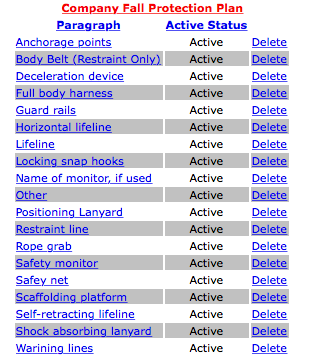
To view how your companies' fall protection plan will appear with all active methods of restraint for each hazard, pre checks, ladder checks and fall protection plan notes click the "Company Fall Protection Plan" link, which will show what the fall protection plan will look like.

The fall protection plan section is only available to users that have the fall protection plan section turned on for their users group. To change users access to fall protection plans, management and office staff can change access in Application Section to view the information about the Application Section Click Here

Table of Contents

#Section Name#Section Name#Section Name
1Add Company Fall Protection Plan Method Of Restraint 2Add Company Fall Protection Plan Method Of Restraint from Default 3Delete Company Fall Protection Plan Method Of Restraint
4Look up Company Fall Protection Plan Method Of Restraint 5Edit Company Fall Protection Plan Method Of Restraint

1.Add Company Fall Protection Plan Method Of Restraint

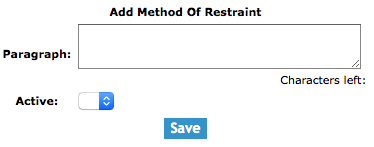
To add a Company Fall Protection Plan Method Of Restraint, click on the 'Add Company Fall Protection Plan Method Of Restraint' link.

On the next screen, under Add Company Fall Protection Method Of Restraint heading, select:

Fields

Paragraph: Allows the user to input the paragraph. Its best to be descriptive of what field staff should be considering for method Of restraint before they begin work on a particular hazard. The character limit of this field is 250.

Active: Allows a user to select the active status. Only method Of restraints set to active will be added to a fall protection plan when a hazard is added.

Then click the 'Save' button. The edit company fall protection plan method Of restraint screen will load. From here, proceed to edit as per the instructions below.

2.Add Company Fall Protection Plan Method Of Restraint from Default

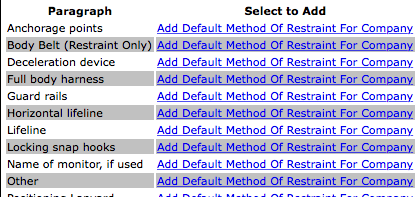
To add a Company fall protection plan method Of restraint from Default, click on the 'Add Company Fall Protection Plan Method Of Restraint From Default' link.

On the next screen, under Default Fall Protection Plan Method Of Restraint heading, select:

Then click the 'Add Default Method Of Restraint For Company' link of the default fall protection plan method Of restraint.

3.Delete Company Fall Protection Plan Method Of Restraint

Deleting company fall protection plan method Of restraint may have to be done if the company fall protection plan method Of restraints was added to the system incorrectly. Only company fall protection plan method Of restraints that have not do not have been included in a fall protection plan can be deleted.

To delete a company fall protection plan method Of restraint click the 'Delete' link of the company fall protection plan method Of restraint you want to delete.

4.Look up Company Fall Protection Plan Ladder Check

To get to the edit screen of a fall protection plan method Of restraint, click on the name of the company method Of restraint that you would like to edit.

5.Edit Company Fall Protection Plan Method Of Restraint

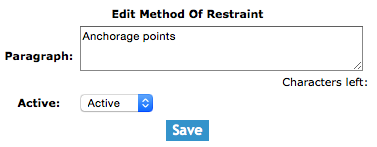
The company fall protection plan method Of restraint section allows users to edit the company fall protection plan method Of restraint. Method Of restraint includes the paragraph descriptions, and active status.

Once on the edit fall protection plan ladder check screen

Fields

Paragraph: Allows the user to input the paragraph. Its best to be descriptive of what field staff should be considering for method Of restraint before they begin work on a particular hazard. The character limit of this field is 250.

Active: Allows a user to select the active status. Only method Of restraint set to active will be added to a fall protection plan.

Once the necessary information has been input, click the 'Save' button.