|
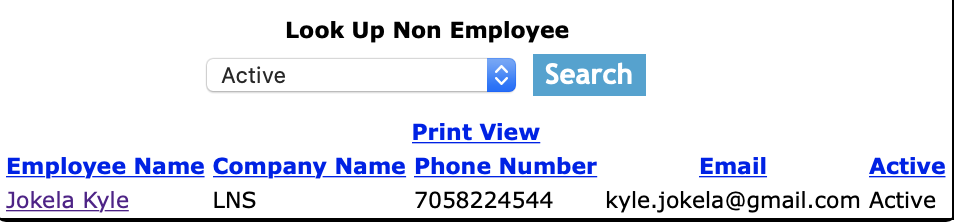
Non Employees are visitors, customers employees, speakers that come to your safety meetings or others, whom may
visit a job site of yours, participate in safety paper work or meetings. SafetyNet is set up to track non employee, allowing
staff quickly to finish paperwork by not having to enter the same non employees each time. SafetyNet records the non employee
first name, last name, phone number and email addresses.
It"s important that non employees get taken off the list of active non employees to keep your
active roster of non employees accurate.
|
|
Confined Space Entry Reports can be searched by a combination of experience type, active status and salary type. Users can narrow search results by choosing any combination of the three search criteria.
All search results can be sorted by clicking on the results headings Employee Name, Initial, Experience Type,User Name, Password, Role, Start Date, End Date, Salary Type, Hours Entry Type,
and Active Status. Clicking on the same heading can do switching the results order from ascending to descending.
|
|
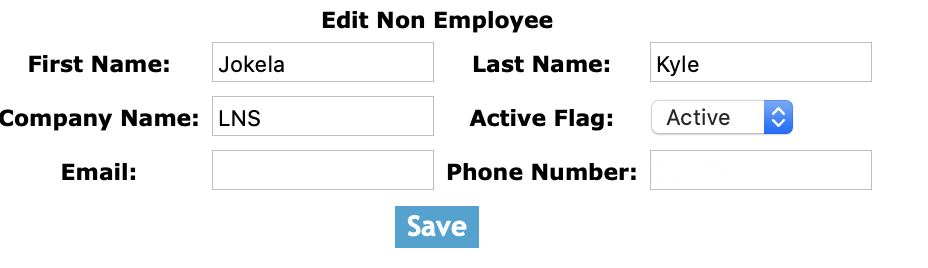
Once on the employee edit screen.
Fields
First Name: Enter the non employee's first name. The character limit of this field is 25.
Last Name: Enter the non employee's last name. The character limit of this field is 25.
Company Name: Enter the non employee's company name. The character limit of this field is 25.
Email: Enter the employee's contact email. The character limit of this field is 50.
Phone Number: Enter the phone number. The character limit is 20.
Click 'Save' button to edit the employee account.
|