|
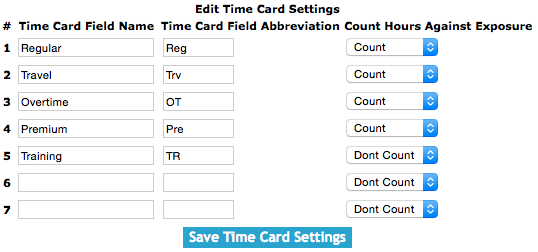
Once on the timecard setting screen.
Under the Edit Timecard Settings heading.
SafetyNet"s timecard settings allow companies to use up to seven separate timecard fields. They are all made up of 3 portions
- Timecard Field Name
- Timecard Field Abbreviation
- Count Hours Against Exposure
Fields
Timecard Field Name: The timecard entry date is the day the work was done. The field defaults to the current date. The format of this field is YYYY-MM-DD.
Timecard Field Abbreviation: Selecting a work order from the select box, which loads with a work order number users can choose which work order the timecard entry is for.
Count Hours Against Exposure: Selecting a either count or dont count from the select box. This field also to track hours for employee"s apprenticeship or
in the case where Dont Count is selected the hours will not be counted against the employee" exposure hours.
Companies may choose to make hours spent driving or spent in training not count against employee"s exposure hours.
Click the 'Save Timecard Settings' button to save the timecard settings.
|