|
Through SafetyNet's company vehicle inspection tasks section companies can manage the tasks a company wants their staff to inspect on vehicle inspections.
Vehicle inspections are made up of questions about vehicle insurance, odometer reading, a notes section, drawings of the windshield, and exterior of the vehicle.
Plus, 3 checklists which companies can customize to match your business and safety programs needs including:
- Visual inspection task
- Operational inspection tasks
- Emergency Supplies inspection tasks
Companies should customize their list of inspection tasks based on the issues that arise the most for your company.
When a vehicle inspection is created the active vehicle inspection tasks will be added to the inspection for users to check as part of their inspection.
Companies can choose to add inspection tasks from SafetyNets library of Default Vehicle Inspection tasks, these default lists of tasks will evolve from the data supplied by other companies from other industries and your industry. Your company has the option to only add inspection tasks from your own list of needs.
To view how your companies' vehicle inspection will appear with all active inspection tasks, click the "Company Vehicle Inspection" link, which will show what the
vehicle inspection will look like.
The vehicle inspection section is only available to users that have the vehicle inspection section turned on for their users group.
To change users access to vehicle inspections, management and office staff
can change access in Application Section to view the information about the Application Section Click Here
|
|
|
1.Search Vehicle Inspection Tasks |
|
Vehicle inspection tasks can be searched by Active or Inactive. Users can narrow down the search with this search criteria.
|

|
2.Delete a Visual Inspection Task |
|
Deleting a visual inspection task may be required if an item was added by mistake. Visual inspection tasks cannot be deleted
after a vehicle inspection has been created with the task on it. Instead of deleting a task after in has been added to a
vehicle inspection, edit the visual inspection tasks and set it to inactive.
To remove a visual inspection task, click the "Delete" link to the right of the task.
|
3.Look up Company Visual Inspection Task |
|
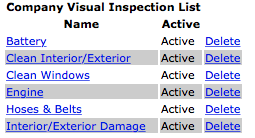
To get to the edit screen of a visual inspection task, click on the name of the task you would like to edit.
|
|
4.Add or Edit Visual Inspection Task |
|
The visual inspection tasks section allows users to add or edit visual inspection tasks of a vehicle inspection.
Visual inspection tasks should include obvious things your staff should be able to find by quickly walking around
a vehicle, including clean interior/exterior, ladders secured and leaks.
To add a new task click on the "Add Vehicle Inspection Task”" link.
To load a tasks to edit, click on the visual inspection task name.
Once on the add or edit screen.
Fields
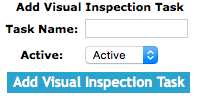
Task Name: Allows a user to name a new visual inspection task. The character limit of this field is 50.
Active: Allows a user to select the active status. Setting a task to inactive will mean, that task will not show up on future vehicle inspections.
|
|
|
Once the data is input, click the "Save Visual Inspection Task" button.
|
5.Delete an Operation Inspection Task |
|
Deleting an operational inspection task may be required if an item was added by mistake. Operation inspection tasks cannot be deleted after a vehicle inspection has been
created with the task on it. Instead of deleting a tasks after in has been added to a vehicle inspection, edit the operation inspection task and set it to inactive.
To remove an operational task, click the "Delete" link to the right of the task.
|
6.Look up Company Operation Inspection Task |
|
To get to the edit screen of a operational inspection task, click on the name of the task you would like to edit.
|

|
7.Add or Edit Operation Inspection Task |
|
The operation inspection task section allows users to add or edit visual inspection tasks of a vehicle inspection. Operation
inspection tasks should include things they encounter operating the vehicle, including accelerating, handling and unusual noises.
To add a new task click on the "Add Vehicle Inspection Task" link.
To load a task to edit, click on the operation inspection task name.
Once on the add or edit screen.
Fields
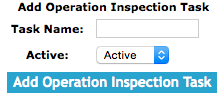
Task Name: Allows a user to name a new operation inspection task. The character limit of this field is 50.
Active: Allows a user to select the active status. Setting a task to inactive will mean, that task will not show up on future vehicle inspections.
|
|
|
Once the data is input, click the "Save Operation Inspection Task" button.
|
8.Delete an Emergency Supplies Inspection Task |
|
Deleting an emergency inspection task may be required if an item was added by mistake. Emergency supplies inspection tasks cannot be deleted
after a vehicle inspection has been created with the task on it. Instead of deleting a tasks after in has been added to a vehicle inspection,
edit the emergency supplies inspection task and set it to inactive.
To remove an task, click the "Delete" link to the right of the task.
|
9.Look up Company Emergency Supplies Tasks |
|
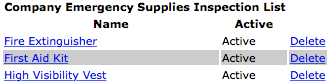
To get to the edit screen of an emergency supplies inspection task, click on the name of the task you would like to edit.
|
|
10.Add or Edit Emergency Supplies Inspection Task |
|
The emergency supplies tasks section allows users to add or edit emergency supplies inspection tasks of a vehicle inspection. Emergency supplies
inspection tasks should include things that should be part of the vehicles emergency preparedness, including safety manual, emergency first aid
kit and fire extinguisher.
To add a new task click on the "Add Vehicle Inspection Task" link.
To load a task to edit, click on the emergency supplies inspection task name.
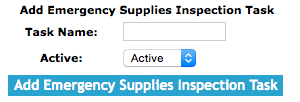
Once on the add or edit screen.
Fields
Task Name: Allows a user to name a new operation inspection task. The character limit of this field is 50.
Active: Allows a user to select the active status. Setting a task to inactive will mean, that task will not show up on future vehicle inspections.
|
|
|
Click the "Save Emergency Procedures" button to ensure that any information changed is saved in the system.
|
11.Add Default Vehicle Inspection Tasks |
|
|
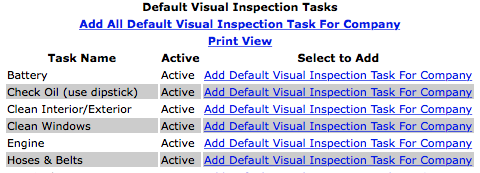
An item can be added to the visual vehicle inspection task by clicking "Add Default Visual Inspection Task For Company"
link to the right of the Task Name.
All of the tasks can be added to the visual Inspection form by clicking the "Add All Default Visual Inspection Tasks for Company" link below the header title.
The form can then be viewed by clicking "Print View" link.
|
12.Add Default Operation Inspection Tasks |
|
|
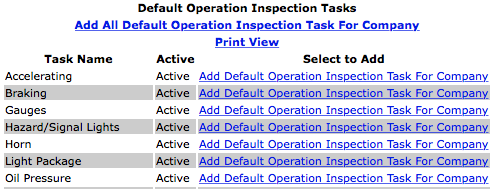
An item can be added to the operation inspection task by clicking "Add Default Operation Inspection Task For Company" link to the right of the Task Name.
All of the tasks can be added to the operation inspection tasks by clicking "Add All Default Operation Inspection Task for Company" link below the header title.
The form can be viewed by clicking "Print View" link.
|
13.Add Default Emergency Supplies Inspection Tasks |
|
|
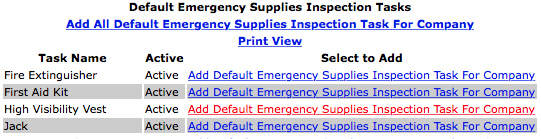
An item can be added to the emergency Supplies Inspection tasks by clicking "Add Default Emergency Supplies Inspection Task For Company" link.
All of the tasks can be added to the emergency supplies inspection tasks by clicking "Add All Default Emergency Supplies Inspection Task For Company" link below the header title.
The form can be viewed by clicking "Print View" link.
|
