|
The company personal protective equipment inspection section allows companies to manage personal protective equipment inspections. Users can create the basis of what will be used by field staff for future personal protective equipment
inspections for personal protective equipment by creating the company personal protective equipment inspections.
Personal Protective Equipment Inspections are made for a piece of personal protective equipment or multiple pieces of personal protective equipment, for each piece of personal protective equipment companies can include a list of details that the company wants field staff to inspect.
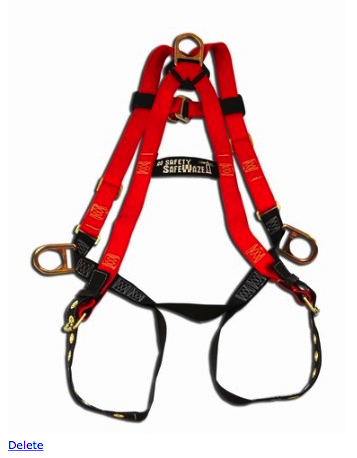
For each piece of personal protective equipment can include a equipment graphic, which can be added to help management illustrate the areas that intended to be inspected.
Company Personal Protective Equipment Inspections can be created from scratch for any personal protective equipment or based on Default Personal Protective Equipment Inspection
from the SafetyNet library of personal protective equipment inspections. Companies can set how often personal protective equipment inspections are to occur in the edit company safety settings.
IMPORTANT NOTE:
Its important to note that a company personal protective equipment inspection are not completed in the field. Personal Protective Equipment Inspections are completed in the field and track which employees participated in these inspections.
The company personal protective equipment inspections for a personal protective equipment are inspections made for personal protective equipment a company use, and the list of inspection tasks field staff should inspect as part of a inspection. Companies can determine
what they want their staff to look at as part of personal protective equipment inspections. One of SafetyNet core beliefs is that saving this information so that I can easily be used and more importantly reused by your staff will
over the course of time save your company time and money.
Configuring how often Personal Protective Equipment Inspections are to Occur
How often personal protective equipment inspections must occur is a function of your companies policy regarding personal protective equipment inspections. SafetyNet Now allows companies to
set how often each individual inspection as well as personal protective equipment inspections as a whole. When adding a personal protective equipment inspection from default inspections the required to
be done field for the inspection is set to the companies personal protective equipment inspection value is set to how often personal protective equipment inspections must be done. To configure Safety Net for how often personal protective equipment inspections for personal protective equipment
should occur can be configured in the company safety settings.
Company Personal Protective Equipment Inspections Appear on Personal Responsibilities Report
Individual Company Personal Protective Equipment Inspections Appear on the Personal Responsibilities Report, how often then must be completed is managed from the company personal protective equipment inspection section. Only active company personal protective equipment inspections
are viewable on the Personal Responsibilities Report. For more information about Personal Responsibilities Report
in this manual click here to view the personal responsibilities section.
Management, Office Staff and Safety Officers can edit how often personal protective equipment inspections should occur in the Company section when they edit the Company Safety settings. For more information about configuring your
company safety settings in this manual click here to view the company section.
The ppe inspection section is only available to users that have the ppe inspection section turned on for their users group.
To change users access to ppe inspections, management and office staff
can change access in Application Section to view the information about the Application Section Click Here
|
|
|
1.Add Company Personal Protective Equipment Inspection |
|
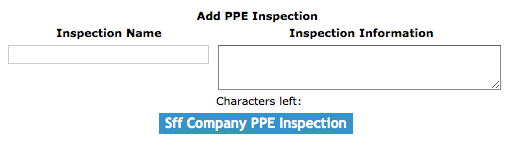
To add a Company Personal Protective Equipment Inspection, click on the 'Add Company Personal Protective Equipment Inspection' link.
On the next screen, under Add Company Personal Protective Equipment Inspection heading, select:
Fields
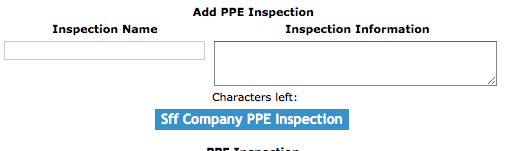
Inspection Name: Allows the user to input the inspection name. Its best to name the inspection after the
personal protective equipment being inspected, if more than one piece of equipment is being added to a inspection
the inspection could be named for they type of work being done with pieces of equipment. The character limit of this field is 50.
Inspection Information: Allows the user to input the inspection information. Allows users to add extra information about the personal protective equipment inspection. The character limit of this field is 500.
Required to be Done: The Required to be Done select box allows users to choose how often a inspection must be completed. If Number of Days is selected
a number of days must be entered in the Number of Days field.
Number of Days: The Number of Days also users to enter a specific number of days a inspection must be completed a new inspection must be done
|
|
|
Then click the 'Add Company Personal Protective Equipment Inspection' button. The edit company personal protective equipment inspection screen will load. From here, proceed to edit as per the instructions below.
|
2.Add From Default Company Personal Protective Equipment Inspection from Default |
|
To add a Company Personal Protective Equipment Inspection from Default, click on the 'Add From Default Company Personal Protective Equipment Inspection' link.
On the next screen, under Default Personal Protective Equipment Inspection heading, select:
Then click the 'Add Default Personal Protective Equipment Inspection For Company' link of the default personal protective equipment inspection.
|

|
3.Delete Company Personal Protective Equipment Inspection |
|
Deleting company personal protective equipment inspections may have to be done if the company personal protective equipment inspections was added to the system incorrectly.
Only company personal protective equipment inspections that have not do not have any details added can be deleted.
To delete a company personal protective equipment inspections click the 'Delete' link of the company personal protective equipment you want to delete.
|
4.Look up Company Personal Protective Equipment Inspection |
|
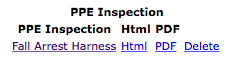
To get to the edit screen of a company personal protective equipment inspection, click on the date of the company personal protective equipment inspection that you would like to edit.
To view the html version company personal protective equipment inspection report in click on the 'Html view' link of the company personal protective equipment inspection you would like to view.
From each html view you can also open the PDF version of the report by clicking on the PDF link on the top of the page.
To view a printable document file (PDF) view of the company personal protective equipment inspection report, click on the 'PDF view' link of the appropriate company personal protective equipment inspection report.
|
|
5.Edit Personal Protective Equipment Inspection |
|
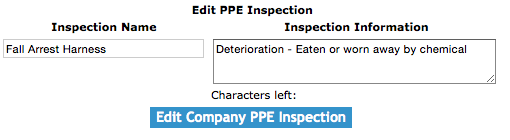
The company personal protective equipment inspection section allows users to add or edit the company personal protective equipment inspection. Personal Protective Equipment inspection includes the
inspection name, inspection information.
Once on the edit equipment inspection screen
Fields
Inspection Name: Allows the user to input the inspection name. Its best to name the inspection after the
personal protective equipment being inspected, if more than one piece of equipment is being added to a inspection
the inspection could be named for they type of work being done with pieces of equipment. The character limit of this field is 50.
Inspection Information: Allows the user to input the inspection information. Allows users to add extra information about the personal protective equipment inspection. The character limit of this field is 500.
Required to be Done: The Required to be Done select box allows users to choose how often a inspection must be completed. If Number of Days is selected
a number of days must be entered in the Number of Days field.
Number of Days: The Number of Days also users to enter a specific number of days a inspection must be completed a new inspection must be done
Active: The active select box allows users to make inspection active or inactive. Only active personal protective inspection will be appear on the list of personal protective equipment inspections field staff
can add new inspections for.
Once the necessary information has been input, click the 'Save' button.
|
|
6.Add Personal Protective Equipment Graphic |
|
Once on the edit personal protective equipment inspection screen
Click the 'Choose file' button.
Select the equipment graphic you would to upload.
Click the 'Add Graphic' button to add a graphic.
|
|
7.Delete Personal Protective Equipment Graphic |
|
Once on the edit personal protective equipment inspection screen
Click the 'Delete' link to delete a equipment graphic.
|
|
8.Add Personal Protective Equipment Inspection Equipment |
|
The company personal protective equipment inspection equipment section allows users to add company personal protective equipment inspection equipment. Personal Protective Equipment inspection equipment are the
equipment which field staff should inspect.
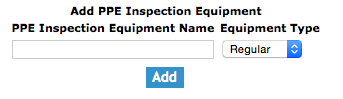
To add a piece of equipment click, the 'Add Personal Protective Equipment Inspection Equipment' link.
Once on the add screen
Fields
Equipment Name: Allows the user to input the equipment name. The equipment name should be a description of the equipment. The character limit of this field is 50.
Equipment Type: By selecting a equipment type from the select box, which loads with a equipment types. The equipment type should be used to put the personal protective equipment inspection in the proper type of equipment.
Once the necessary information has been input, click the 'Add' button.
|
|
9.Look up Personal Protective Equipment Inspection Equipment |
|
Once on the edit personal protective equipment inspection screen
Under the Company Personal Protective Equipment Inspection Equipment heading will load with the personal protective equipment inspection equipment
Click the 'Edit' link of the personal protective equipment inspection equipment you would like to edit.
|

|
10.Edit Personal Protective Equipment Inspection Equipment |
|
Once on the edit personal protective equipment inspection equipment screen
Fields
Number: The number field sets the order of which the equipment inspection tasks will appear on in the equipment inspection.
Equipment Inspection Task: The equipment inspection tasks are the tasks involved in a equipment inspection.
Inspection Tasks should be tasks field staff should be looking for as part of the equipment inspection. The character limit of this field is 75.
Active: The active select box allows users to make inspection details active or inactive. Only active personal protective inspection equipment will be added personal protective equipment inspections.
Once the necessary information has been input, click the 'Edit' button.
|

|
11.Delete Personal Protective Equipment Inspection Equipment |
|
Deleting a company personal protective equipment inspection equipment may need to be done if a piece of equipment was added incorrectly or is not appropriate for the company personal protective equipment inspection. To delete the detail, click on the 'Delete'
link to the right of the company personal protective equipment inspection equipment column.
Once on the edit personal protective equipment inspection screen
Under the Company Personal Protective Equipment Inspection Equipment heading will load with the personal protective equipment inspection equipment
Click the 'Delete' link of the personal protective equipment inspection equipment you would like to delete.
|
|
|
12.Add Equipment Detail |
|
The company personal protective equipment inspection equipment detail section allows users to add company personal
protective equipment inspection equipment details. Personal Protective Equipment Inspection Equipment Details are the
inspections tasks which field staff should carry out during a personal protective equipment inspection.
To add a new detail click, the 'Add Personal Protective Equipment Inspection Equipment Detail' link.
Once on the add screen
Fields
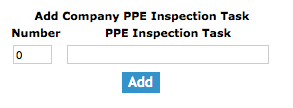
Number: The number field sets the order of which the personal protective equipment inspection equipment tasks will appear on in the personal protective equipment inspection.
Personal Protective Equipment Inspection Task: The personal protective equipment inspection tasks are the tasks involved in a personal protective equipment inspection.
Inspection Tasks should be tasks field staff should be looking for as part of the personal protective equipment inspection. The character limit of this field is 75.
Once the necessary information has been input, click the 'Add' button.
|
|
13.Look up Equipment Detail |
|
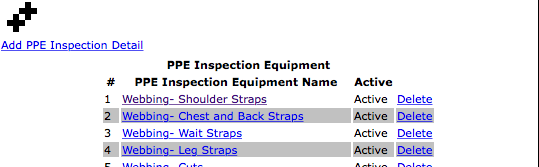
Once on the edit personal protective equipment inspection equipment screen
Under the Company Personal Protective Equipment Inspection Equipment Details heading will load with the personal protective equipment inspection equipment details
Click the 'Edit' link of the personal protective equipment inspection equipment detail you would like to edit.
|
|
14.Edit Equipment Detail |
|
Once on the edit personal protective equipment inspection equipment detail screen
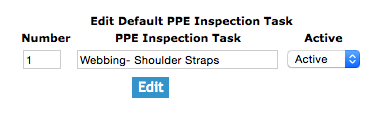
Fields
Number: The number field sets the order of which the equipment inspection tasks will appear on in the equipment inspection.
Personal Protective Equipment Inspection Task: The personal protective equipment inspection equipment tasks are the tasks involved in a personal protective equipment inspection.
Inspection Tasks should be tasks field staff should be looking for as part of the personal protective equipment inspection. The character limit of this field is 75.
Active: The active select box allows users to make personal protective inspection details active or inactive. Only active personal protective inspection details will be added personal protective equipment inspections.
Once the necessary information has been input, click the 'Edit' button.
|
|
15.Delete Equipment Detail |
|
Deleting a company personal protective equipment inspection details may need to be done if a detail was added incorrectly or is not appropriate for the company equipment inspection. To delete the detail, click on the 'Delete'
link to the right of the company personal protective equipment inspection equipment detail column.
Once on the edit personal protective equipment inspection equipment screen
Under the Company Personal Protective Equipment Inspection Equipment Details heading will load with the personal protective equipment inspection equipment details
Click the 'Delete' link of the personal protective equipment inspection equipment detail you would like to edit.
|
|
|
