|
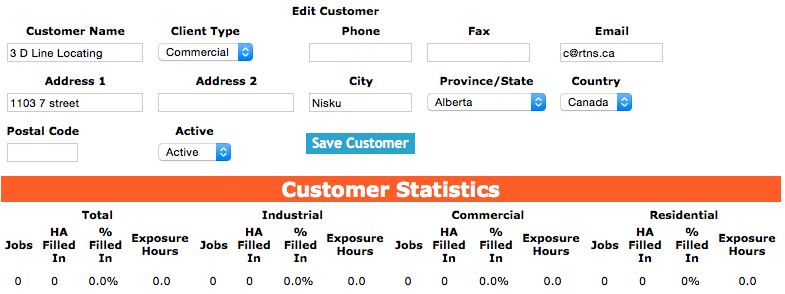
Adding a customer will create a customer and the first job site for that customer. For more
information about managing job sites click here. Also once a customer is created, safetynet
users can create work orders for more information about managing work orders click here.
To add a Customer, click on the 'Add Customer' link.
On the next screen, under Add Customer heading:
Fields
Customer Name: The name of the customer your company is doing the work for. The character limit of this field is 75.
Client Type: Choose from commercial / industrial/residential. SafetyNet breaks down work between the three categories.
Phone: The phone number of the customer. The character limit of this field is 25 characters.
Fax: The fax number of the customer. The character limit of this field is 25.
Email The email address of the company contact. The character limit of this field is 50.
Address 1: The address of the customer. The character limit of this field is 50.
Address 2: A second address line for the customer. The character limit of this field is 40.
City: The name of the city the customer is located in. The character limit of this field is 40.
Province/State: The province or state that the customer is located in.*
Country: The country that the customer is located in.<*
Postal Code: A postal code for the customer. The character limit of this field is 25.
Site Contact Email: The site contact email field allows field staff to include the email address for a customer. The character limit of this field is 100.
Click the 'Save Customer ' button, to add the customer.
*To ensure we provide our customers with the proper guidance on matters of safety we restrict
the countries, province/states we allow our customers to file safety paperwork for. We will strive to increase
our service area as required. But only job sites located in the provinces/states that are in our service area
will be allowed to have work orders created for them.
|