Manual

Job Site

The job site section allows management to manage the job sites of the customers that they do work for. After creating a job site for the customer users can add work orders for work you perform on their job site.

Sometime job sites your company may be doing work on, may require that you are doing work for a different customer on the same job site. Instead of adding the same job site to the system twice, you can create the reference for a job site for another customer. In SafetyNet this is called adding a Multi Job Site record.

Job Sites come in all shapes and sizes especially in the service business, it just might not be practical for field staff to complete site orientations, fire extinguisher inspections or first aid kit inspections for every job site they visit. SafetyNet allows clients to customize their system to their business situation. To this end SafetyNet allows management to configure Job Sites to require or not to require site orientations, fire extinguisher inspections or first aid kit inspections.

For job sites companies can create company site orientations, company first aid kit inspections, and company fire extinguisher inspections. Company Orientations and Inspections can be used by field staff to create orientations and inspections quicker and easier, because instead of creating orientations and orientations from scratch each time, field staff can use existing orientations and inspections to start. Once new information is added to orientations and inspections the new submitted orientations and inspections can become the company orientations and inspections.

Configuring How Often Site Orientations Should Occur

Configuring a how often companies require field staff to complete site orientations is a function of a companies policy. This can be configured in the company safety settings.For more information about configuring your company safety settings, check out the company safety settings in this manual click here.

Creating Company Site Orientations for Jobsites

The Company Site Orientation section allows companies to develop the site orientation documents, without having to carry out a site orientation. For more information about managing company site orientation in this manual click here.

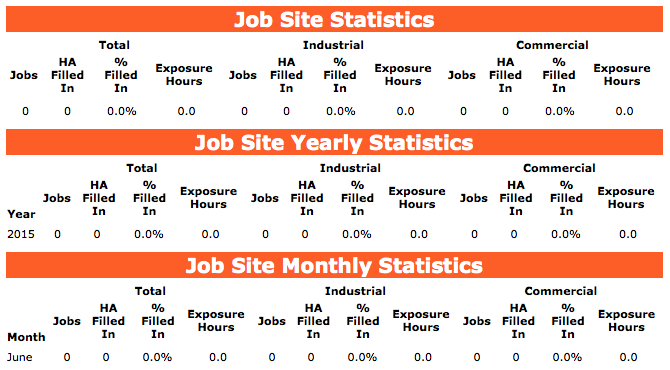
Once work orders and job sites are created for job sites SafetyNet"s main purpose takes over, Safety Statistics Tracking. As staff enter timecard entries and complete site inspections, site orientations, emergency response plans, hazard assessments, safety inspections, fire extinguisher inspections, first aid kit inspections, and safety investigations. Statistics for job site"s will be tracked for specific months, years and overall.

Table of Contents

#Section Name#Section Name#Section Name
1Search Job Site 2Delete Job Site 3Add Job Site
4Look Up Job Site 5Edit Job Site 6Add Job site from other Customer
7Delete Multi Job Site

1.Search Job Site

Job Sites can be searched by a combination of active status, client type, province/state and country. Users can narrow search results by choosing any combination of the four search criteria.

All search results can be sorted by clicking on the results headings Job Site Name,Customer Name, Address 1, Address 2, City, Province/State, Country, Postal Code, Phone Number, Fax Number, Contact Name, Email, and Active Status. Clicking on the same heading can do switching the results order from ascending to descending.

2.Delete Job Site

Clicking the delete link of a job site record. Will delete the job site record in the system. Only job sites that do not have work orders created for them will be deleted.

3.Add Job Site

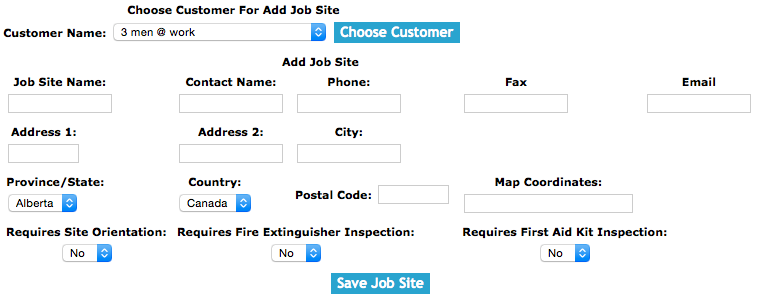
To add a Job Site, click on the 'Add Job Site' link.

Then choose the customer from the customer select box and click the 'Choose Customer' button.

On the next screen, under Add Job Site heading:

Fields

Job Site Name: Enter the job site name. The character limit of this field is 75.

Contact Name: Enter a contact name for the job site. The character limit of this field is 50.

Email: Enter the job site contact email. The character limit of this field is 50.

Phone: Enter the job site phone number. The character limit of this field is 25.

Fax: Enter the job site fax number. The character limit of this field is 25.

Active: Choose the active flag in the select box.

Address 1 and 2: Enter the address where the job site is located. The character limit of this field is 40.

City: Enter the city where the job site is located. The character limit of this field is 40.

Province/State: Choose the province/state in the select box.

Country: Choose the country in the select box.

Postal Code: Enter the postal code. The character limit of this field is 25.

Map Coordinates: Enter the map coordinates. The character limit of this field is 50.

Requires Site Orientation: Choose from the select box either Yes or No. Yes will mean that a company will require field staff to complete site orientations. In the company safety settings section users can edit how often site orientations must occur. For more information about editing company safety settings click here.

Requires Fire Extinguisher Inspection: Choose from the select box either Yes or No. Yes will mean that a company will require field staff to complete fire extinguisher inspections. In the company safety settings section users can edit how often fire extinguisher inspections must occur. For more information about editing company safety settings click here.

Requires First Aid Kit Inspection: Choose from the select box either Yes or No. Yes will mean that a company will require field staff to complete first aid kit inspections. In the company safety settings section users can edit how often first aid kit inspections must occur. For more information about editing company safety settings click here.

Site Contact Email: The site contact email field allows field staff to include the email address for a job site. The character limit of this field is 100.

Click the 'Save Job Site ' button, to add the job site.

4.Look Up Job Site

Once in the Job Site section. Click on the name of the job site, this will load the edit job site view along with the job sites associated safety statistics.

5.Edit Job Site

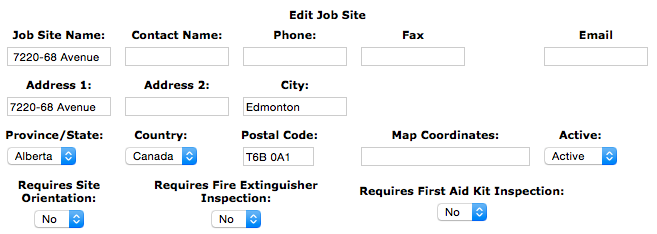
Once on the edit job site section, under the Edit Job Site heading:

Fields

Job Site Name: Enter the job site name. The character limit of this field is 75.

Contact Name: Enter a contact name for the job site. The character limit of this field is 50.

Email: Enter the job site contact email. The character limit of this field is 50.

Phone: Enter the job site phone number. The character limit of this field is 25.

Fax: Enter the job site fax number. The character limit of this field is 25.

Active: Choose the active flag in the select box.

Address 1 and 2: Enter the address where the job site is located. The character limit of this field is 40.

City: Enter the city where the job site is located. The character limit of this field is 40.

Province/State: Choose the province/state in the select box.

Country: Choose the country in the select box.

Postal Code: Enter the postal code. The character limit of this field is 25.

Map Coordinates: Enter the map coordinates. The character limit of this field is 50.

Active Status: The active status flag can be set to Active or In Active, only active customers can have job sites and work orders.

Requires Site Orientation: Choose from the select box either Yes or No. Yes will mean that a company will require field staff to complete site orientations. In the company safety settings section users can edit how often site orientations must occur. For more information about editing company safety settings click here.

Requires Fire Extinguisher Inspection: Choose from the select box either Yes or No. Yes will mean that a company will require field staff to complete fire extinguisher inspections. In the company safety settings section users can edit how often fire extinguisher inspections must occur. For more information about editing company safety settings click here.

Requires First Aid Kit Inspection: Choose from the select box either Yes or No. Yes will mean that a company will require field staff to complete first aid kit inspections. In the company safety settings section users can edit how often first aid kit inspections must occur. For more information about editing company safety settings click here.

Site Contact Email: The site contact email field allows field staff to include the email address for a job site. The character limit of this field is 100.

Click the 'Save Job Site ' button, to edit the job site.

6.Add Job site from other Customer

Once on the edit job site section, under the Choose Customer For Add Multi Job Site heading:

Select a customer from the customer select box.

Click the 'Add Job Site for Selected Customer ' button, to add the job site for the selected.

7.Delete Multi Job Site

Once on the edit job site section, under the Multi Job Site heading:

Clicking the delete link of a multi job site record. Will delete the multi job site record in the system. Only job sites that do not have work orders created for them will be deleted.