Manual

Training Course

Training Courses for Company are the courses your company is going to track for your employee. You can create a course name and description and set how many years the training is good for. Users also have an ability to add your preferred training partner for courses*.

When staff get emails when training has expired, they will be able to see the preferred training partner if you have set it up for the course.

When a course is added a training records for each employee in the system.

Add Training Partner/ Service Providers

Training Partners for your training courses are managed in the Service section of safetynet allows companies to manage the services providers that provide training and repairs. For more information about managing service providers in this manual click here to view the Service section.

Table of Contents

#Section Name#Section Name#Section Name
1Add Training Course 2Add Training Course From Default 3Look Up Training Course
4Edit Training Course 5Add Training Partner for Course 6Delete Training Course

1.Add Training Course

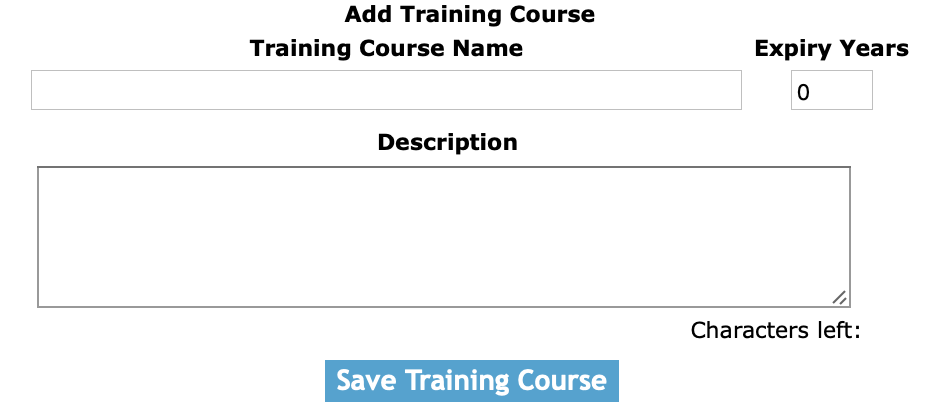
Once on the training course screen, click on the add Training course button.

Fields

Training Course Name: Enter the course name. The character limit of this field is 50.

Description: Enter the description of the course. The character limit of this field is 250.

Expiry Years: Enter the expiry year of the course.

Click the 'Save Training Course' button to add the training course.

3.Add Training Course From Default

Once on the training course screen, click on the 'Add From Default Training Course' link.

By clicking on the Add Default Training Course from default link, of the training course value you would like to add.

3.Look Up Training Course

By clicking on the training course link, of the training course value you would like view you will be taken to the edit training course screen.

4.Edit Training Course

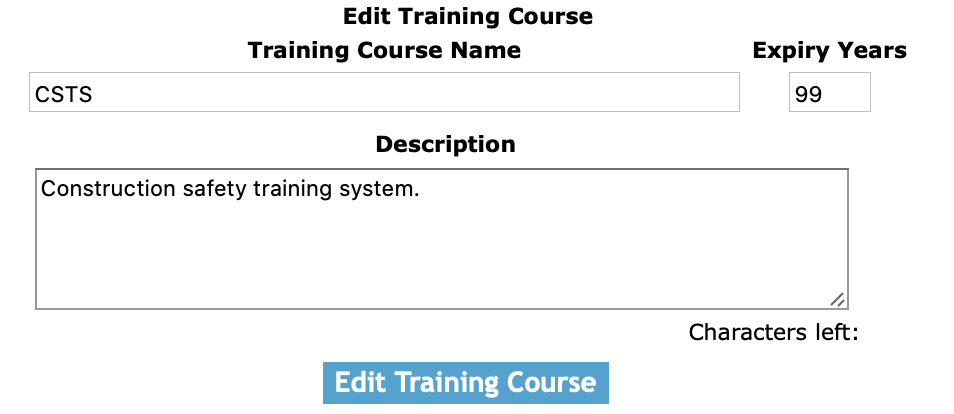
Once you have looked up training course, you will be on the edit training course screen. Here you can change the training course name.

Fields

Training Course Name: Enter the course name. The character limit of this field is 50.

Description: Enter the description of the course. The character limit of this field is 250.

Expiry Years: Enter the expiry year of the course.

Click the 'Save Training Course' button to edit the training course.

5.Add Training Partner for Course

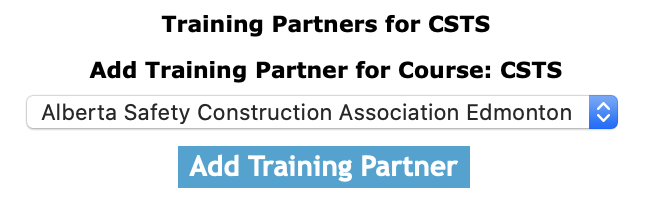
Choose the training company in the select box, and then click the 'add training partner' button to add the training partner to the training course.

6.Delete Training Course

Clicking the delete link of a training course record. Will delete the training course record in the system.