Manual

Company Fire Extinguisher Inspections

The company fire extinguisher inspection section allows companies to manage fire extinguisher inspections. Users can create the basis of what will be used by field staff for future fire extinguisher inspections for job sites by creating the company fire extinguisher inspections. Company Fire Extinguisher Inspections can be created from scratch for any jobsite or based on Fire Extinguisher Inspection carried out by field staff. Job Sites can be setup to require employees to complete Fire Extinguisher Inspections by setting the fire extinguisher inspection to required in the edit jobsite. Companies can set how often fire extinguisher inspections are to occur in the edit company safety settings.

Since each job site is different, safetynet allows a field staff to setup a specific company fire extinguisher inspection for each job site. Each Company Fire Extinguisher Inspection for a job site is set up with a number of sections; basic information, then fire extinguisher details.

IMPORTANT NOTE:

Its important to note that a company fire extinguisher inspection are not completed in the field. Fire Extinguisher Inspections are completed in the field and track which employees participated in these inspections. The company fire extinguisher inspections for a job site is simply the repository of locations of fire extinguishers and what types and sizes of fire extinguishers are found at these locations on site. One of SafetyNet core beliefs is that saving this information so that I can easily be used and more importantly reused by your staff will over the course of time save your company time and money.

Configuring how often Fire Extinguisher Inspections are to Occur

How often fire extinguisher inspections must occur is a function of your companies policy regarding fire extinguisher inspections. To configure Safety Net for how often fire extinguisher inspections for job sites should occur can be configured in the company safety settings.

Management, Office Staff and Safety Officers can edit how often fire extinguisher inspections should occur in the Company section when they edit the Company Safety settings. For more information about configuring your company safety settings in this manual click here to view the company section.

Configuring Jobsite Fire Extinguisher Inspection requirement

Job Sites come in all shapes and sizes especially in the service business, it just might not be practical for field staff to complete fire extinguisher inspection for every job site they visit. SafetyNet allows clients to customize their system to their business situation. To this end SafetyNet allows management, safety officers and office staff to configure Job Sites to require or not to require fire extinguisher inspections. For more information about changing the Job Site, fire extinguisher inspection requirement in this manual click here to view the Job Site section.

Creating Company Fire Extinguisher Inspection from Fire Extinguisher Inspections

Once a Fire Extinguisher Inspection for a job site has been reviewed by management; management has the option of taking all the information from the fire extinguisher inspection and creating or editing the Company Fire Extinguisher Inspection for that jobsite, with the simple click of a button. For more information about transferring fire extinguisher inspection to company fire extinguisher inspection in this manual click here to view the Fire Extinguisher Inspection section.

The fire extinguisher inspection section is only available to users that have the fire extinguisher inspection section turned on for their users group. To change users access to fire extinguisher inspections, management and office staff can change access in Application Section to view the information about the Application Section Click Here

Table of Contents

#Section Name#Section Name#Section Name
1Search Company Fire Extinguisher Inspection 2Delete Company Fire Extinguisher Inspection 3Look up Company Fire Extinguisher Inspection
4Add Company Fire Extinguisher Inspection for Job Site 5Search Customer on Add Company Fire Extinguisher Inspection 6Add or Edit Company Fire Extinguisher Inspection Details
7Delete a Company Fire Extinguisher Inspection Detail

1.Search Company Fire Extinguisher Inspection

Company Fire Extinguisher Inspections can be searched by a companies$ customers. Users can narrow search results by choosing to search a specific customer of the company.

All search results can also be sorted by clicking on the results headings Job site name, Site Address. Clicking on the same heading can do switching the results order from ascending to descending.

2.Delete Company Fire Extinguisher Inspection

Deleting company fire extinguisher inspections may have to be done if the company fire extinguisher inspections was added to the system incorrectly. Only company fire extinguisher inspections that have not do not have any details added can be deleted.

To delete a company fire extinguisher inspections click the 'Delete' link of the company fire extinguisher you want to delete.

3.Look up Company Fire Extinguisher Inspection

To get to the edit screen of a company fire extinguisher inspection, click on the date of the company fire extinguisher inspection that you would like to edit.

To view the html version company fire extinguisher inspection report in click on the 'Html view' link of the company fire extinguisher inspection you would like to view.

From each html view you can also open the PDF version of the report by clicking on the PDF link on the top of the page.

To view a printable document file (PDF) view of the company fire extinguisher inspection report, click on the 'PDF view' link of the appropriate company fire extinguisher inspection report.

4.Add Company Fire Extinguisher Inspection for Jobsite

To add a Company Fire Extinguisher Inspection, click on the 'Add Company Fire Extinguisher Inspection' link.

On the next screen, under Add Company Fire Extinguisher Inspection heading, select:

Fields

Job Site By selecting a job site from the select box, which loads with a customer$s name and then the jobsite name users can choose which jobsite they want to create a company fire extinguisher inspection for. NOTE: To narrow down the numbers of jobsites to choose from use the 'Search Customer on Add Company Fire Extinguisher Inspection' function.

Then click the 'Add Company Fire Extinguisher Inspection' button. The edit company fire extinguisher inspection screen will load. From here, proceed to edit as per the instructions below.

5.Search Customer on Add Company Fire Extinguisher Inspection

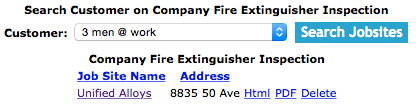
While on the 'Add Company Fire Extinguisher for Job Site' screen, Under the Search Customer on Add Company Fire Extinguisher Inspections heading choose a customer:

Fields

Customer: The Customer select box is populated with companies$ customers.

Click the 'Search Jobsites' button. The Job Site select box on the Add Company Fire Extinguisher Inspection section will load with only the jobsites of the selected customer.

6.Add or Edit Company Fire Extinguisher Inspection Details

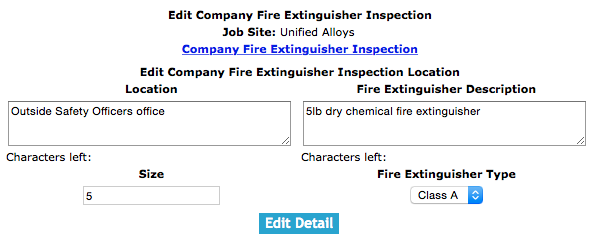
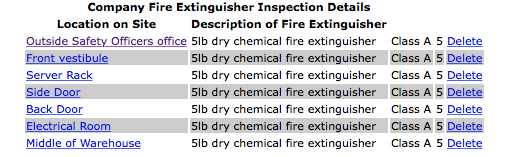
The company fire extinguisher inspection detail section allows users to add or edit the company fire extinguisher inspection details of a jobsite. Fire Extinguisher inspection details are the actual fire extinguisher that are located on the job site and what the type and size of fire extinguisher are in each location.

To add a new detail click, the 'Add Fire Extinguisher Inspection Detail'.

To load a detail to edit, click on the detail.

Once the add or edit screen

Fields

Location: Allows the user to input the location of the fire extinguisher. It may not be obvious when working on a large site where every fire extinguisher is located a simple description of where a fire extinguisher is located can go a long way in making inspections meaningful. The character limit of this field is 250.

Fire Extinguisher Description: Allows the user to input specific information about the fire extinguisher such as fire extinguisher classification. The character limit of this field is 250.

Size: Allows the user to input the size of the fire extinguisher.

Fire Extinguisher Type: Allows the user to select the fire extinguisher type.

Once the necessary information has been input, click the 'Save Details' button.

7.Delete a Company Fire Extinguisher Inspection Detail

Deleting company fire extinguisher inspection detail may have to be done if the company fire extinguisher inspection detail was added to the system incorrectly.

To delete a company fire extinguisher inspection detail, click the 'Delete' link of the company fire extinguisher inspection detail you want to delete.