|
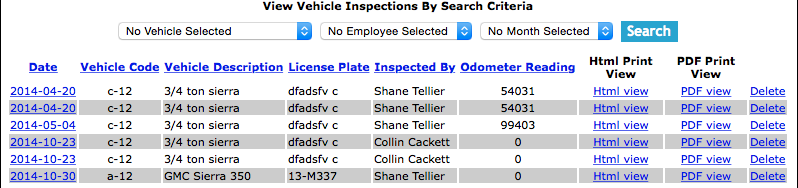
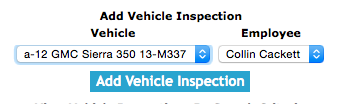
The vehicle inspection section allows a user to input the results of a driver$s
vehicle inspection report. The vehicle inspection can be setup to be done on a
daily, weekly or monthly basis. The vehicle inspection is set up in a number of
sections; basic information, the visual check, operational inspection, emergency
preparedness checks, exterior damage and windshield damage drawings.
SafetyNets Smartphone application allows field staff to complete vehicle inspections
in the field and submit them to the system. In the Smartphone version of the vehicle inspection, field staff
can include a sketch of exterior damage and windshield damage. For information about completing a vehicle
inspection through the Smartphone click here.
Once a vehicle inspection is submitted:
- An email can be sent to the person in charge of the vehicle management.
(For more information about email alerts check the email alerts section of the manual)
- If there are tasks on the vehicle inspection marked as requiring attention a maintenance report is created for that vehicle.
- Safety Net Statistics are updated for number of vehicle inspections completed for companies, employees, and vehicles.
- Safety Net Statistics are updated for number of kilometers driven for companies and vehicles.
Maintenance Report Creation
Maintenance Reports are created for tasks that require attention, once a vehicle inspection
is submitted to SafetyNet. The following reports also create maintenance reports when submitted:
- Vehicle Inspections
- Personal Protective Equipment Inspections
- Equipment Inspections
- First Aid Kit Inspections
- Fire Extinguisher Inspections
For more information about Maintenance Reports in this manual click here to view the maintenance section.
Configuring Safety Net Vehicle Inspection task lists
On a Vehicle Inspection there are 3 sections of lists that companies must maintain. They are Visual Inspection Tasks, Operational Inspection Tasks and Emergency Preparedness Inspection Tasks. These three sections make up the
majority of the Vehicle inspection. Companies can choose tasks from the list of Safety Net’s default vehicle inspection tasks or add their own tasks to tailor their inspection to their companies needs.
For more information about company vehicle inspection tasks lists check out the Vehicle Inspection Tasks lists section of the manual.
Configuring Safety Net for how often a Vehicle Inspection should occur
Safety Net can be configured to email staff when they must complete a vehicle inspection for the company vehicle they are the primary driver for.
Setting up how often vehicle inspections should occur
How often vehicle inspections must occur is a function of your companies policy regarding vehicle inspections. To configure Safety Net for how often vehicle inspection should occur can be configured in the company safety settings.
Management, Office Staff and Safety Officers can edit how often vehicle inspections should occur in the Company section when they edit the Company Safety settings.
For more information about company safety setting check out the Edit Company Safety Settings in the Company section of the manual.
Setting up Employees as Primary Drivers for Vehicles
Company Vehicles and employees can be configured to manage and track whom is the primary driver of specific company vehicles. For each vehicle a primary driver is assigned.
Management, Office Staff and Safety Officers can edit primary drivers of company vehicles.
For more information about editing vehicles primary driver check out the Edit Vehicle in the Vehicle section of the manual.
The vehicle inspection section is only available to users that have the vehicle inspection section turned on for their users group.
To change users access to vehicle inspections, management and office staff
can change access in Application Section to view the information about the Application Section Click Here
|

 App Manual
 App Manual